NPR (ink-style rendering)
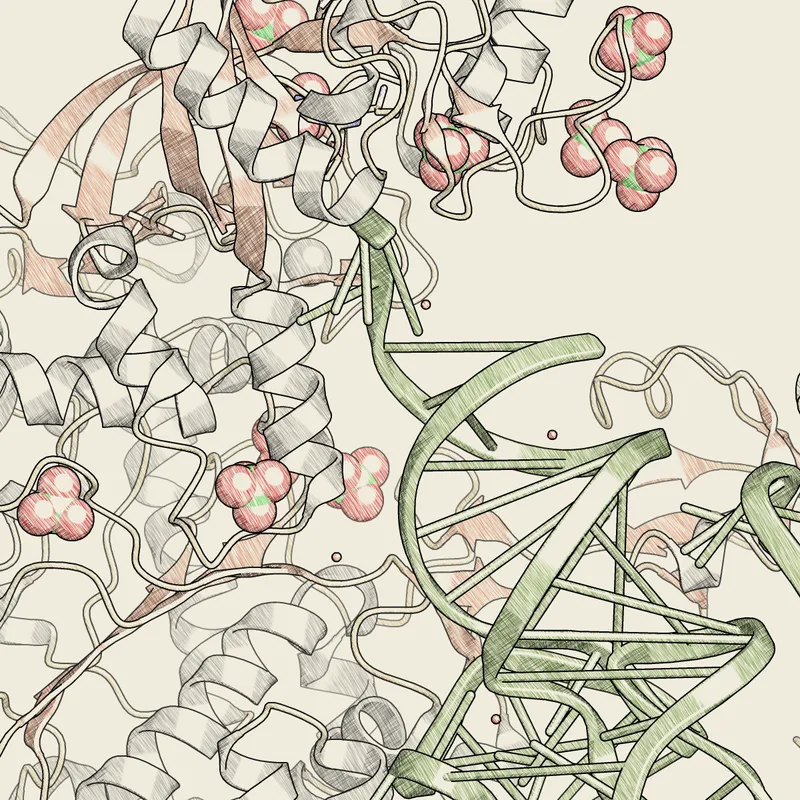
Umbreon (NPR) is a rendering backend that expresses shading with hatching (collections of lines or dots) instead of photorealistic ray tracing. The result looks like a figure drawn in ink on paper.
Because it uses the built-in Umbreon, no external program or path setting is needed, just as with Rendering.
Usage
Select Umbreon (NPR) in Backend on the run bar of the rendering window. A Hatching section appears in the Render tab, and a Detail tab is added to Render Settings.
First choose the overall feel with Style in Hatching, and if needed adjust the density and thickness of lines and dots with Mark density and Mark width. If this is not enough, edit the contents of the style in the Detail tab.
Hatching (Render tab)
| Item | Default | Description |
|---|---|---|
| Style | richardson | Template for the drawing feel (see below) |
| Coloring | Style default | How ink and paper colors are combined (see below) |
| Mark density | 1.0 (0.25-4) | Multiplier that divides the spacing of lines and dots. At 2, the number of lines and dots doubles |
| Mark width | 1.0 (0.25-4) | Multiplier for line thickness and dot size |
| Custom ink color / Ink color | OFF / #000000 |
The ink color is specified explicitly only when ON |
| Custom paper color / Paper color | OFF / #ffffff |
The paper color is specified explicitly only when ON |
| Default contour edges | ON | Draws contour lines also for Renderers that have no edge lines configured |
Mark density and Mark width are multipliers applied uniformly to the per-layer values of the style. Even for a style made of several layers, the ratio of spacings between layers is preserved.
Style
The first three (richardson / ink-cross / manga) each define a complete look, including how tones are built and the ink colors. The remaining six define only how marks are arranged; the paper and ink colors are chosen with Coloring.
| Style | Description |
|---|---|
| richardson | Jane Richardson-style colored-pencil ribbon figure. An ink in the Object's color on a paper base, three pencils of the same hue, and bright areas left as bare paper (default) |
| ink-cross | Plain pen drawing. Black cross-hatching on white paper |
| manga | Flat fill for each part + screentone dots and hard ink lines |
| pen-cross | Three layers of hard cross-hatching lines (45 / -45 / 0 degrees), no wobble |
| pencil | Two layers of soft pencil lines. Wobble, width variation, tapered strokes, paper grain |
| engraving | Engraving style with single-direction lines divided finely |
| stipple | Scattered dots of uniform size, with tone expressed by the number of dots (stippling for scientific figures) |
| screentone-60 | 45-degree halftone dot screen |
| manga-square | 45-degree square-dot screen |
Coloring
The combination of ink and base (paper / fill) is chosen independently of the style.
| Coloring | Description |
|---|---|
| Style default | Leaves it to the style's own settings (default) |
| Ink on paper | Black ink on paper. Pen drawing |
| Colored ink on paper | Colored ink on paper. Colored-pencil drawing |
| Ink on color fill | Black ink over a flat fill in the Renderer's color. Comic style |
| Colored ink on color fill | Colored ink over a flat fill. Printed-matter style |
If you choose anything other than Style default, the style's colors are not used
richardson has its own warm paper and per-part ink colors. Choosing an explicit combination in Coloring overrides them. Conversely, using a Style that defines only how marks are arranged (pen-cross and below) with Style default fixes the combination to black ink on white paper.
Differences in Quality
The Quality section of Umbreon (NPR) differs from the photorealistic Umbreon in the following points.
- Lighting has only two options, Raytrace only (default) and Ambient Occlusion. Global illumination is disabled when hatching is used, so there is no GI lighting axis.
- Supersampling has the same meaning. The minimum hatching spacing is determined not by the output pixels but by the grid after supersampling, so raising it is effective for fine styles.
The other individual settings (Lights / Ambient Occlusion / Shadows / Edges / Transparency) are the same as in Rendering (only the Lights defaults differ from the photorealistic Umbreon: Light intensity 1.55 / Flash fraction 0.6).
Detail tab
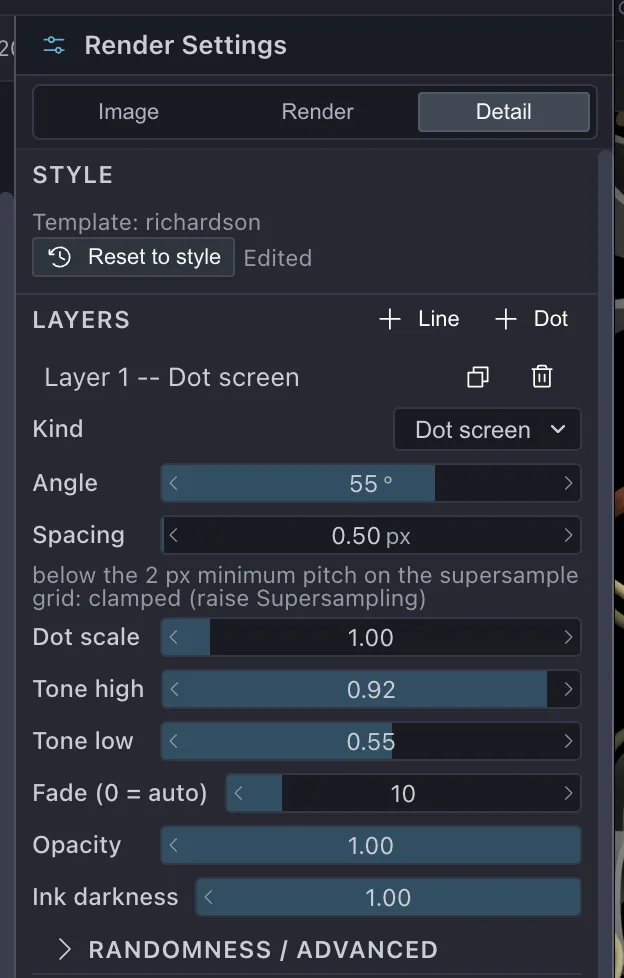
The Style selected in the Render tab is loaded as a template, and its contents can be edited.
Style template: <style name> is shown at the top of the tab.
- An Edited badge appears once you edit.
- Reset to style returns to the state of the template.
- When you switch the Style in the Render tab, the edits are discarded without confirmation.
Edits are saved in the scene
Edits in the Detail tab are saved in the scene, like the other rendering settings (→ Saving settings). An unedited style is rendered through exactly the same path as before this feature existed.
Layers
Hatching is built by stacking several layers. Each layer has one grid, on which lines or dots are placed. Layers can be added with the Line / Dot buttons in the section header, and duplicated or deleted from each layer's header.
| Item | Default | Range | Description |
|---|---|---|---|
| Kind | Line (lines) / Dot screen (halftone dots) / Stipple (stippling) | ||
| Angle | 45 | -180 to 180 degrees | Orientation of the grid |
| Spacing | 10 | 0.25-64 px | Spacing of the grid |
| Width | 1.1 | 0.1-8 px | Line thickness (Line only) |
| Dot scale | 1 | 0.1-8 | Dot size (Dot screen / Stipple only) |
| Tone high | 0.95 | 0-1 | Brightness at which the first mark appears |
| Tone low | 0.55 | 0-1 | Brightness at which the last mark appears. No more marks are added below this |
| Fade (0 = auto) | 16 | 0-64 | How quickly a mark grows to its maximum size after appearing. 0 means automatic |
| Opacity | 1 | 0-1 | Opacity of the layer |
| Ink darkness | 1 | 0-1 | Darkness of the ink |
Opening Randomness / Advanced shows the wobble settings that give a hand-drawn look, and finer shape settings. Items unrelated to the Kind are not shown.
| Kind | Items in Randomness / Advanced |
|---|---|
| Common | Edge softness / Seed / Position jitter / Paper tooth / Tooth scale |
| Line / Dot screen | Nesting levels |
| Line | Wobble / Wobble wavelength / Width jitter / Stroke length / Stroke gap / Stroke taper / Angle jitter / Length jitter |
| Dot screen / Stipple | Shape exponent / Aspect / Dot angle |
| Dot screen | Merge to solid |
Nesting levels is the number of nesting levels of the grid. As the tone gets darker, new marks are inserted between the existing marks. Marks never disappear or move, so there is no flicker even when the brightness changes continuously.
Shading
Determines how much ink a given brightness is converted into. Two items are always shown.
| Item | Default | Range | Description |
|---|---|---|---|
| Strength | 1 | 0.25-3 | Overall increase or decrease of the amount of ink. Raising it darkens the whole image |
| Curve | 1 | 0.5-2 | How the midtones are shifted |
Advanced contains the settings for how tones are built (Diffuse weight / Ambient / Wrap / Contour darkening / Contour power / Contour light bias / Contact AO / Shape AO / Black point / White point / Highlight knee / Highlight softness / Gamma / Specular cut / Tone levels) and the ink model (Mode / Base / Ink / Ink color / Paper color / Min contrast / Ink shade / Tone fog / Fill posterize).
If the whole image is too light, raise Strength
Lighting in the molecular view is bright and flat, so with some styles the default leaves the hatching sparse. Adjust Strength first, then Curve.
Settings that have no effect are not shown
Items that do not affect the image are either hidden or disabled.
- Items that do not apply to the Kind (such as Stroke length for Dot screen) are not shown.
- Items that are disabled by other values remain visible but cannot be changed (such as Contour power when Contour darkening is 0, or Seed when wobble is not used).
- A layer whose Spacing has reached the minimum spacing after supersampling (2 px) displays a note to that effect. Raising Supersampling resolves it.
Display of effective values
Mark density and Mark width remain multipliers on the Render tab side and are not baked into the layer values. When the multiplier is not 1, the Detail tab also shows the values after the multiplier is applied. This keeps edits reversible.
See also
- Rendering — Settings for Umbreon (photorealistic)
- Rendering window — Layout and operation of the window
- Edge lines — Contour line settings on the Renderer side
Verified against: CueMol3 2.3.14.525