Selection builder
The selection builder is a widget for assembling a selection through GUI operations, without writing a selection expression by hand. It is available in the following places.
- Selection panel — always present in the panel (→ Side panels)
- Any selection expression input field — in the New Renderer dialog, tool dialogs such as molecular surface generation and superposition, the Paint selection cell of the Color panel, and so on, the ▼ button opens the same widget as a popover
The result of an operation in the builder is always reflected in the input field as a selection expression. The generated expression can be edited by hand as it is, so the builder is also a shortcut for learning the syntax.
Tab layout
| Tab | Role |
|---|---|
| Named | Apply a defined selection with one click |
| History | Apply a previously used expression with one click |
| Term | Build a single condition (term) and combine it with the current selection |
| Mod | Transform the current selection itself |
Named and History are for choosing a ready-made expression; Term and Mod are for building or modifying a selection.
Named
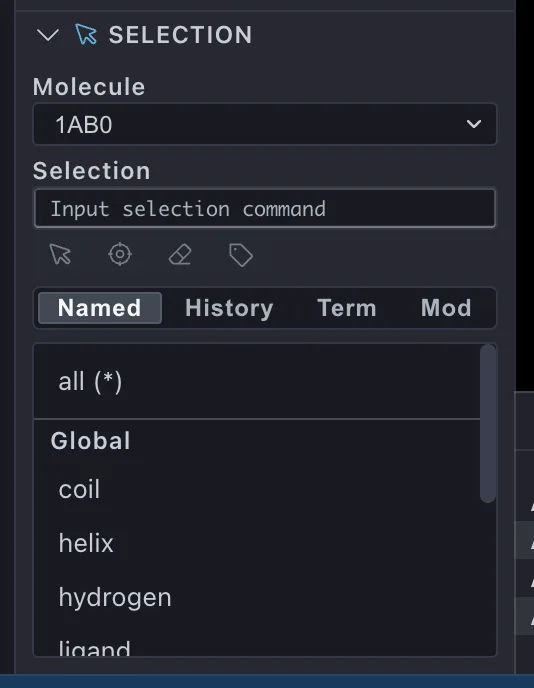
After all (*) (all atoms) at the top, the defined selections are listed in three sections. A click replaces the current selection and applies it immediately (in a popover, the popover then closes).
Only all (*) is placed outside the sections. * is selection expression syntax, not a saved definition, so it belongs to no section (→ Selection expression syntax).
- Selected
- The selection expression currently applied to the target molecule
- Scene
- Named selection definitions saved in the scene
- Global
- Definitions shared by all scenes. Built-in selections such as
proteinandwaterare listed here
History
The history of previously applied selection expressions (up to 100 entries). A click applies the expression again. The history is saved in the application and is shared by every operation that applies a selection and records into it (the Selection panel, the selection fields of the inspector and the New Renderer dialog, selections made from the scene tree, the sequence panel and the context menu, rectangle / lasso selection, and the Molecular structure panel). The whole selection (*) and the empty selection are not recorded (the whole selection can always be chosen from the top of Named). Intermediate results of combining in the Term / Mod tabs are not recorded either.
The height of the Named / History lists depends on where they are placed. In the Selection panel the lists fill the rest of the panel; in a popover they fit into the free space on the side where it opened.
Term
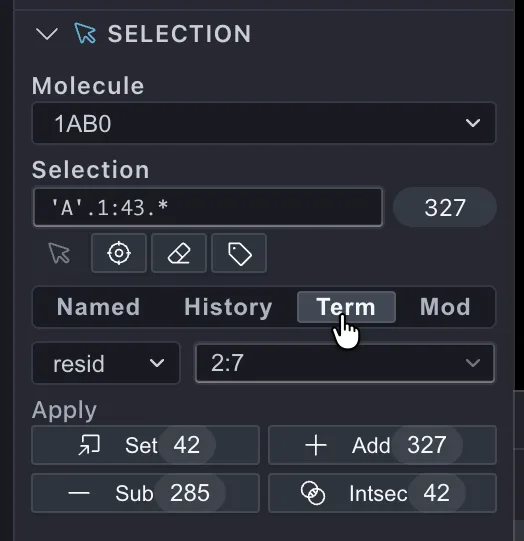
Build a single condition (term) from a keyword and a value, then combine it with the current selection using the apply buttons.
| Button | Meaning |
|---|---|
| Set | Replace the selection with the term |
| Add | Add the term to the selection (union) |
| Sub | Remove the term from the selection (difference) |
| Intsec | Keep the intersection of the term and the selection (intersection) |
When the selection is empty, pressing Enter in the value field is enough to apply Set.
The keywords include the following. The value field changes according to the keyword, and chain names, residue names, atom names and elements are autocompleted from the loaded molecule.
| Keyword | Meaning | How to specify the value |
|---|---|---|
| Named / History | Use a defined selection or a history entry as the term | Choose from the list |
| hier | Chain / residue / atom hierarchy specification | Three fields (e.g. A / 2:3 / CA) |
| chain | Chain name | Choose from the candidates or type |
| resid | Residue number | Number or range (e.g. 2:7) |
| resn / name / elem | Residue name / atom name / element | Choose from the candidates or type |
| Altloc | ID of the alternate conformation (altloc) | |
| bfac | Temperature factor | Comparison operator and value |
| rprop | Residue property | Property name and value |
| all / none | Everything / empty | No value |
Using Named / History as a keyword allows combinations such as "take the intersection with a defined selection" or "remove a history expression from the current selection".
Mod
Transforms the current selection itself. No term is taken.
| Button | Transformation |
|---|---|
| Invert | Invert the selection |
| Byres | Expand to whole residues that are at least partly selected |
| Sidech / Mainch | Keep only the side-chain / main-chain part |
| Arnd | Replace with the atoms within the specified distance of the selection (Around) |
| Expn | Add the surrounding atoms to the selection (Expand) |
The distance for Arnd / Expn is chosen from the preset values (3 to 10 Å) in the adjacent dropdown.
Atom count display
Next to the apply buttons, the number of atoms that would be selected if the operation were applied is shown, so the result can be anticipated before operating. Values above 9999 are abbreviated as 12k / 1.2M; hovering the pointer shows the exact value.
See also
- Selection expression syntax — the grammar of the expressions the builder generates
- Side panels — the Selection panel
- Selecting part of a molecule — tutorial
Verified against: CueMol3 2.3.14.525