tube
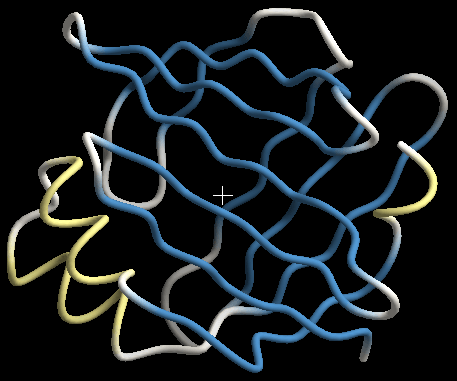
A Renderer that displays the backbone of proteins and nucleic acids as a smooth tube. Target Object: molecule (MolCoord). The backbone is drawn as a uniform tube regardless of the secondary structure assignment.
Properties
For the common properties, see Common Renderer properties.
Tube
- Axial detail
- Number of polygon subdivisions along the chain. Larger values give a smoother tube but slow down rendering
- Smoothness
- At 0, the tube is a curve passing through the positions of the pivot atoms. Below that, it is a smooth curve that does not pass through the pivot atoms
- Smooth color
- When the colors of adjacent residues differ, ON makes the coloring between residues a gradient
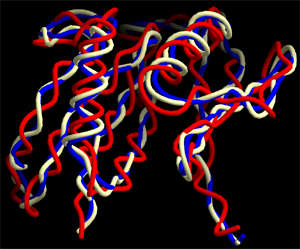
- Pivot atom name
- Name of the atom the tube passes through. The default for proteins is CA (Cα carbon atom).
The figure below compares different pivot atoms
- Start / End type
- Shape of the ends (sphere / flat / none)
Section
Settings for the cross-section shape of the tube.
- Type
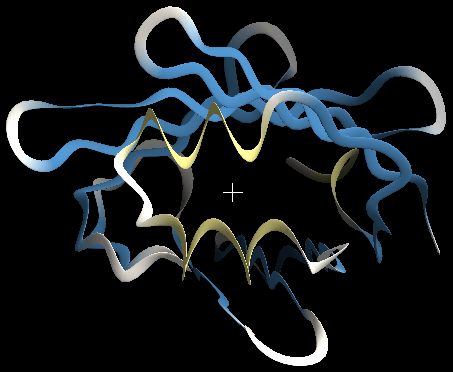
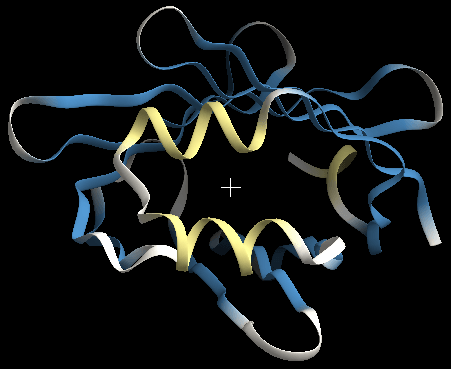
- Shape of the cross section. The default is elliptical. The other options are round_square (rectangle with rounded corners, left in the figure below) and
rectangle (rectangle with sharp corners, right in the figure below)


- Detail
- Number of polygon subdivisions around the cross section. Larger values give a smoother surface but increase the load (minimum 2). If the rendered image looks angular, increasing this together with Axial detail fixes it
- Width1, Width2
- Thickness of the tube in Å. Width1 is the radius in the horizontal direction and Width2 is the radius in the vertical direction.
Left: Width1 (0.5 Å) > Width2 (0.1 Å). Right: Width1 (0.1 Å) < Width2 (0.5 Å) (Type is elliptical)
- Tuber
- Flatness of the tube. Specifies the ratio of the thickness in the normal direction to that in the binormal direction.
A value other than 1 gives a tube with an elliptical cross section.
Left in the figure below: tuber = 3 (width = 0.35). Right: tuber = 0.3 (width = 1.16). Cases that use tuber < 1 are rare
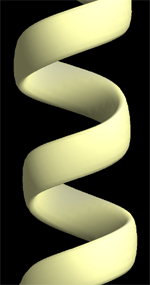
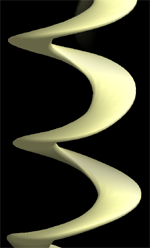
- Sharpness
- Effective only when Type is round_square. Specifies how rounded the corners are.
At 1, the shape is as angular as rectangle; close to 0, it approaches elliptical.
In the figure below, left is 0.1 and right is 0.9


Putty
Putty is a display setting that varies the thickness of the tube according to a parameter such as the B-factor. At the maximum value of the parameter, the thickness becomes High scale times larger; at the minimum value, it becomes 1/Low scale of the original. Parts with values in between change continuously (linear interpolation).
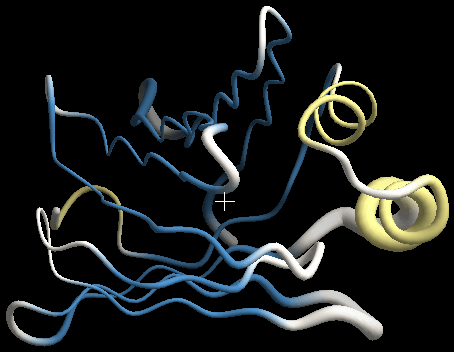
- Mode
- off does not use putty (constant thickness). Linear and Scaling vary the thickness according to the parameter specified in Target
- Target
- The parameter that drives the thickness. B-factor or Occupancy can be selected
- Low scale
- Thickness scaling value at the minimum value of the parameter. At the residue with the smallest parameter value, the tube thins to 1/Low scale of its thickness. The default is 1/3
- High scale
- Thickness scaling value at the maximum value of the parameter. At the residue with the largest parameter value, the tube thickens by a factor of High scale. The default is 3
See also
- Renderer list
- nucl — tube + base display for nucleic acids
- spline — smoothed backbone display with lines
- ribbon — ribbon display according to secondary structure
- Material / Edge lines
Last checked: 2026-08-11 / Verified against: development build (tritium)