PyM console
PyM console is a PyMOL-compatible console available in Console.
It interprets a subset of the PyMOL command language.
Commands you used in PyMOL, such as fetch 1crn or bg_color white, can be typed as they are.
Up to 2.3.20.539 this was a separate plugin called PyM console.
Full compatibility with PyMOL is not a goal. The aim is that commands you already know work. Command parsing and Tab completion are ported from the PyMOL implementation, and the error messages are the same.
Enabling it
The Console plugin is enabled by default, and the Console tab is the first tab of the bottom panel
(→ Plugins). Choose PyMOL with the switch at the left end of the toolbar,
or type just pymol on a line and run it, to switch to PyM console (→ Switching modes).
Input and completion
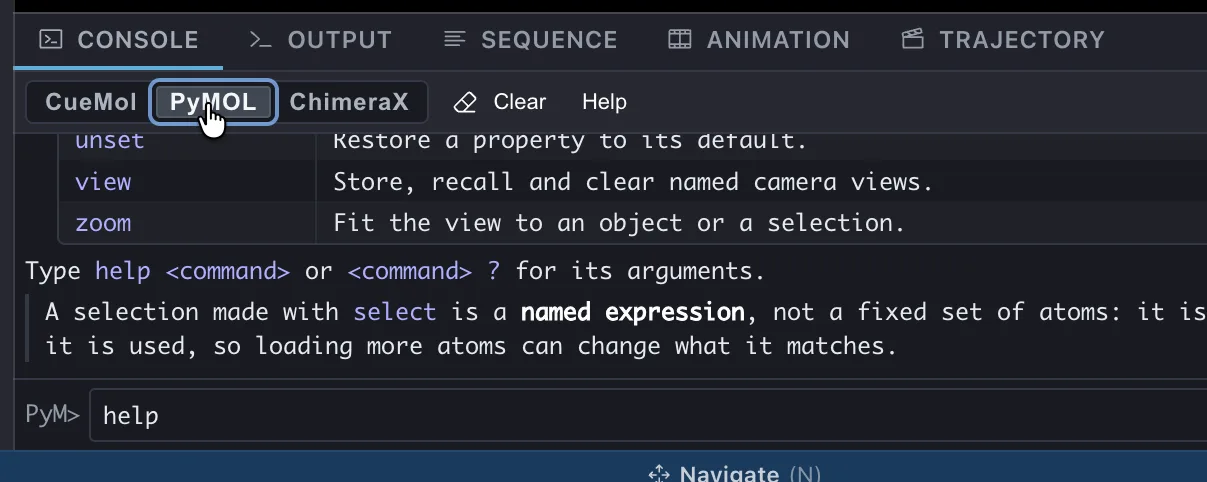
The prompt is PyM>.
| Action | Behavior |
|---|---|
| Enter | Runs the command |
| Shift+Enter | Inserts a line break |
| Tab | Completes the part before the cursor; the part after the cursor is left as it is. When there are multiple candidates, a list is shown just above the prompt. Pressing the key again while the list is shown opens a menu for choosing a candidate (→ Input and completion) |
| Up / Down | Browse the input history (separate from the history of native mode) |
- The behavior of Tab follows PyMOL. It does not complete when the command name is already settled, and falls back to file name expansion when nothing matches.
- Confirming a Japanese input conversion with Enter does not run the command.
- One run is grouped into one Undo step.
- Clear on the toolbar clears the log area, and Help shows the list of PyM console commands.
- While a command is running, Stop appears next to "Running...". Pressing it stops before the next command and cancels a download in progress. Whatever has already been executed is kept.
Scripts and logs
@file.pmlorrun file.pmlruns a.pmlscript. A script can call another script. The whole script is grouped into one Undo step.log_openopens a file (log.pmlby default), and the commands typed at the prompt afterwards are recorded.log_closeends the recording. The recorded file can be re-run as it is with@. Commands run from a script are not recorded.- A file of operations recorded in native mode (
.qax) cannot be run in PyM console. Switch to native mode to run it (→ Recording and replaying operations).
Supported commands
The arguments of each command can be checked with help <command>.
| Category | Commands |
|---|---|
| Loading and saving | load / fetch / save / png / ray / run |
| Object | delete / set_name / enable / disable / get_names / get_chains |
| Selection | select / indicate / deselect / count_atoms |
| Display | show / hide / as (show_as) / color / spectrum / set_color / bg_color / label |
| Map | isomesh / isosurface / isolevel |
| Measurement | distance / angle / dihedral |
| Superposition | align / super / pair_fit |
| View | zoom / center / orient / reset / turn / move / view / get_view / set_view / refresh |
| Animation | mplay / mstop / rewind / frame / count_states |
| Settings | set / get / unset |
| Scripts and logs | @ / run / log_open / log_close / log |
| Others | undo / redo / cd / pwd / ls / help / quit / exit |
loadaccepts structure and map files,http(s)://URLs,.qsc/.psescenes, and.pmlscripts. A.qscis opened in a new tab unless the current scene is new and empty.fetchdownloads from RCSB.type=pdb1and similar fetch biological assemblies, andtype=2fofc/type=fofcfetch density maps. Writing1abcAor1abc_Akeeps only that chain.savedecides the format by the extension. Molecules (optionally only the selected part) are saved as.pdb/.sdf/.mol/.pqr, scenes as.qsc, and views as.png/.pov/.stl.raydraws the view with rendering (GI). It can be stopped with Stop while running, and the followingpngsaves that image (if the view or scene was changed in the meantime, the normal view is saved).pngwithray=1renders and saves on the spot.align/super/pair_fitdisplay the RMSD. Bothalignandsupersuperpose with US-align and do not perform a sequence alignment. Along with the RMSD, the number of aligned residues and the TM-score are also displayed.pair_fitis a least-squares superposition that pairs atoms in order.get_view/set_viewuse the same 18-number format as PyMOL.labelaccepts PyMOL expressions (such as"%s%s" % (resn, resi)).- With
cutofformode,distancelists the contacts between two selections and labels them. - PyMOL keyword and positional arguments such as
quiet=1andasync=0are also accepted. Arguments that have no effect produce a warning and are ignored. - PyMOL settings that have an equivalent quantity in CueMol, such as
stick_radius/transparency/line_width/solvent_radius/label_size/label_color, are mapped to the corresponding properties. Values set beforeshowalso apply to what is displayed afterwards. quit/exitquit CueMol3. If there are unsaved changes, a confirmation is shown.quit force=true(orquit -f) quits without confirmation.
Translation of selection expressions
A PyMOL selection expression is translated into a CueMol selection expression before it is run
(it is not passed through as it is). The operator precedence is the same in both,
but some symbols have different meanings. Object names can also be used inside a selection expression
(such as 1abc and chain A).
Corresponding terms
| Kind | PyMOL | CueMol |
|---|---|---|
| Terms that take a value | name (n.) / elem (e. / element / symbol) / resn (r. / resname) / chain (c.) / alt (altloc) |
Terms with the same name |
resi (i. / resid / resv) |
resi (ranges: see below) |
|
id |
aid |
|
ss H / ss S / ss L |
helix / sheet / coil |
|
| Comparison | b / q with < / > / = (==) |
bfac / occ |
| Macros | all / * / none |
* / none |
protein (polymer.protein) / nucleic (polymer.nucleic) / polymer |
protein / nucleic / (protein) or (nucleic) |
|
water / solvent |
water |
|
hydro / hydrogens |
hydrogen |
|
hetatm / organic |
ligand |
|
backbone / sidechain / guide |
An expression listing the backbone atom names / its negation / (protein) and (name CA) |
|
| Operators | and (&) / or (\|) / not (!) / byres (br.) / around (a.) / expand (x.) |
The same operators |
| Forms taking two selections | s1 within D of s2 (w.) |
(s1) and ((s2) expand D) |
s1 near_to D of s2 (nto.) |
(s1) and ((s2) around D) |
|
s1 beyond D of s2 (be.) |
(s1) and not ((s2) expand D) |
hetatmis a PDB record type, but CueMol does not keep it, so it is replaced withligand(anything that is not protein, nucleic acid, or water). Different atoms are selected for modified residues.backboneisN/CA/C/O/OXTfor proteins, andP/OP1/OP2/O5*/C5*/C4*/C3*/O3*for nucleic acids.
+ and -
A selection expression is split into terms by spaces and parentheses, and the meaning of + and - depends on whether they stand alone as a term.
| Notation | Meaning | CueMol |
|---|---|---|
name CA+CB (+ inside a term) |
List of values | name CA,CB |
resi 1-10 (- inside a term) |
Range of residue numbers | resi 1:10 |
resi -5--1 |
Range of negative residue numbers | resi -5:-1 |
chain A + chain B (standalone +) |
Union (or) |
(chain A) or (chain B) |
protein - chain A (standalone -) |
Difference | (protein) and not (chain A) |
Object names and named selections
- A selection expression is translated for each molecule. An Object name is replaced with
allin that molecule and withnonein the other molecules. When a selection expression contains an Object name, only that molecule is targeted. - A term that is not an Object name is treated as a CueMol named selection. Writing
%namehas the same effect.
What cannot be translated
The following terms cause an error that names them.
| Kind | Terms |
|---|---|
| Operators | in / like / neighbor (nbr.) / extend / first / last / bound_to / byobject / bysegi / bychain / bycalpha / bymolecule / gap |
| Properties | segi (s.) / index (use id instead) / model (m.; use an Object name instead) / x / y / z / flag (f) / rep / color / pepseq (ps) / text_type / numeric_type / stereo / rank / partial_charge / formal_charge |
| Macros | inorganic / metals / donors / acceptors / visible / enabled / bonded / masked / protected / center / origin |
| Comparison | <= / >= / != (CueMol comparisons are only < / > / =) |
| Notation | Slash notation such as /1abc//A/10/CA (write chain A and resi 10 and name CA), within without a left-hand selection, around without a distance, within without of |
Limitations
- Raw Python is not accepted. Python scripts (
.py/.pym) are rejected with a message that names them. volumeandisodotare not implemented.- A selection specification that is not supported is rejected with the reason and the offending term named, instead of silently selecting different atoms.
- Measurements (
distance/angle/dihedral) produce one label per command. A selection is treated as its single centroid. Measurement is possible only within one molecule (whendistancelists contacts, it can also measure between two molecules). show/hidedo not affect Renderers created in the GUI. These commands operate only on Renderers whose names start withpym:.zoom/center/orientand map clipping work on one molecule.- Not supported: MD trajectory commands (
load_traj/intra_fit/smooth, etc.), commands that depend on picking (edit/drag, etc.),h_add/cealign, and so on. Saving to.cifand.pseis not possible.
See also
Verified against: CueMol3 2.4.0.546