AI Agent
A chat panel in which a model builds a scene by calling CueMol3 operations in sequence, based on a text description of the state you want to see. This plugin is disabled by default, and an API key from OpenAI, Anthropic, or Google (Gemini) is required to use it (usage costs are borne by the user).
In preparation
This page is a skeleton. How to write instructions and a list of what the agent can do will be added later.
Enabling the plugin
Enable AI Agent in Settings > Plugins > Installed (→ Plugins). Once enabled, an AI Agent icon is added to the activity bar. The panel can be opened only from this activity view (not from a menu or a command).
Model and API key settings
The settings are in Settings > Plugins > AI Agent (this page appears when the plugin is enabled).
| Item | Default | Description |
|---|---|---|
| Model | openai:gpt-5.6 |
The model to use, in the form provider:model-name. Choose from the candidates, or enter an ID available to your account directly. The provider part (openai / anthropic / google) determines which of the API keys below is used |
| Reasoning effort | low | How long the model thinks before answering. Higher values are slower and cost more |
| Pressing Enter | start a new line | What happens when Enter is pressed in the message box. With start a new line, messages are sent with Cmd+Enter / Ctrl+Enter. Choosing send the message reverses this |
| OpenAI API key | (not set) | Key used for openai: models |
| Anthropic API key | (not set) | Key used for anthropic: models |
| Google AI API key | (not set) | Key used for google: models (a Gemini API key issued in Google AI Studio) |
Where API keys are stored
API keys are encrypted and stored in the OS secure storage (Keychain on macOS, DPAPI on Windows, the desktop keyring on Linux), and are not written to the settings file in plain text. If no stored key exists, the environment variables OPENAI_API_KEY / ANTHROPIC_API_KEY / GEMINI_API_KEY are used.
Leaving a field empty does not delete a stored key. To delete it, press Clear. In environments where the OS cannot encrypt keys, keys are not stored and you are directed to use environment variables.
Usage
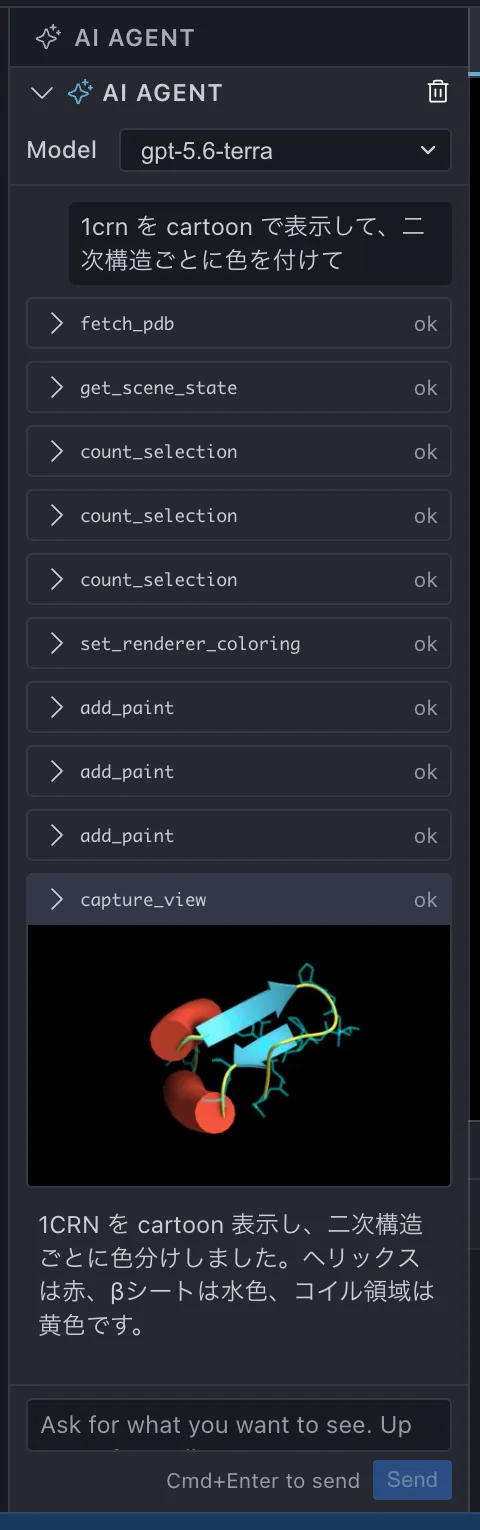
- Type an instruction such as "Load 1CRN and show it as a cartoon" in the input box and send it. By default, Enter inserts a line break and Cmd+Enter / Ctrl+Enter sends (this can be swapped with Pressing Enter above).
- While a task is running, Send changes to Stop, which stops it midway.
- The Model at the top of the panel switches the model to use. It is the same setting as Model in Settings. The list shows only the models that can be used with the saved keys, among the providers whose API key is saved, and is updated immediately when a key is saved or cleared. The model cannot be switched while a task is running.
- Up / Down recall previously sent instructions.
- One instruction is grouped into one Undo. A single Cmd+Z undoes all the changes made by that instruction. The operations performed by an instruction are recorded in the History panel of the Actions view.
- Clear chat at the top right of the panel clears the conversation.
What it can do
The model can view the current view as an image (capture_view) and proceeds while checking the results of its own operations. That image is shown as a reduced thumbnail in the tool row of the log. Only the latest image is kept in the conversation.
Limitations
- Only one scene is targeted. Operations apply to the scene that was active when the instruction started. Even if you instruct "in a new scene", the data is loaded into the current scene.
- Scene files (
.qsc) cannot be opened. Open them with File > Open. - Changes you make by hand while a task is running are included in the Undo of that instruction.
- While a Console command or an MCP Server call is running, instructions you send are not executed (conversely, while an instruction is running, Console and MCP Server operations are rejected).
- The conversation is lost when the application is quit.
- The behavior when the provider is switched in the middle of a conversation has not been verified.
See also
Verified against: CueMol3 2.4.0.546